
Account
Goa Game Withdraw Screen
How the withdraw option is opened, where bank details are entered, and which requests this website will never make.
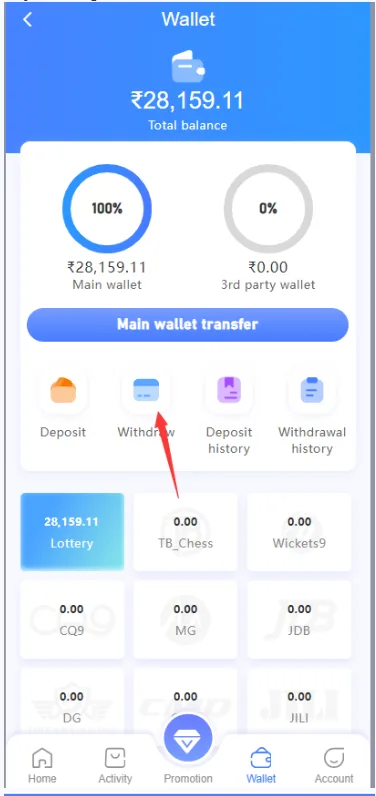
Withdrawal, when it is available, is handled inside the wallet of the signed-in account. Timing, fees, and limits are whatever that screen states. This website does not process withdrawals and does not ask for your bank password.
Find withdraw
Open Wallet and select the withdraw option shown there. If the control is disabled, the platform may require a minimum balance, a verification step, or a waiting period. Read the message on the screen instead of guessing.
Amount and bank details
Enter an amount within the limits on the form and the bank details that belong to you. Check the name and account number before you submit. A wrong digit can send money to the wrong place, and recovery is not something this guide site can do.
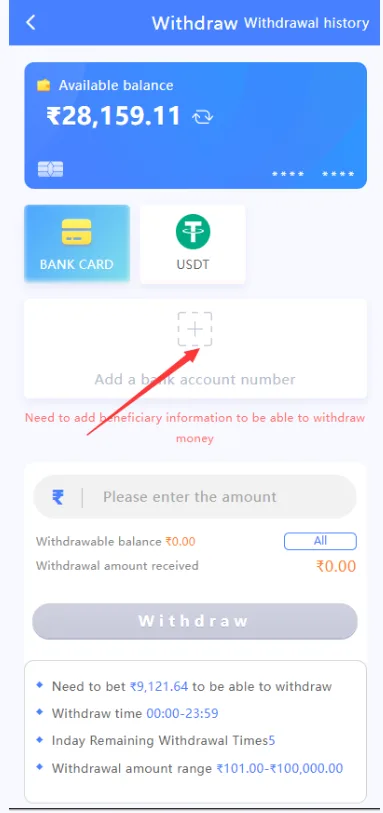
After you submit
- Keep the reference or status the platform shows.
- Do not pay a “release fee” to a private account to speed up a withdrawal.
- Do not share OTP from your bank with anyone claiming to be Goa Game staff.
- If status stays pending beyond the time on screen, use in-app support.
Deposits are covered in the recharge guide. Account access is in login. For money risk notes, see responsible gaming.