
Account
Goa Game Recharge Screen
Where the wallet recharge screen sits, what payment-method steps can look like, and what this website never asks you to pay.
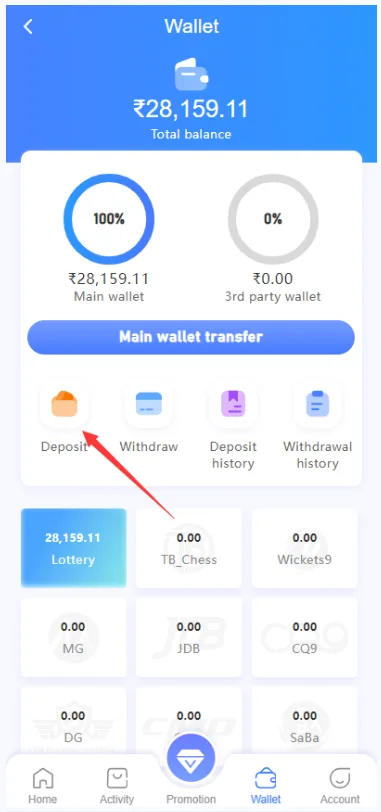
Recharge, when the platform offers it, starts from the wallet inside the signed-in account. Use only the payment methods shown on that screen. This website does not take payments, does not list a UPI ID for deposits, and does not process cards or USDT. The marks on the homepage payment section are examples of methods that can appear on the platform wallet—not a checkout on this domain.
Open the wallet
From the signed-in app, open Wallet and look for Recharge or Deposit. If those labels are missing, the platform may have renamed the control or temporarily closed deposits. Do not follow a private message that asks you to “recharge to this number” instead.
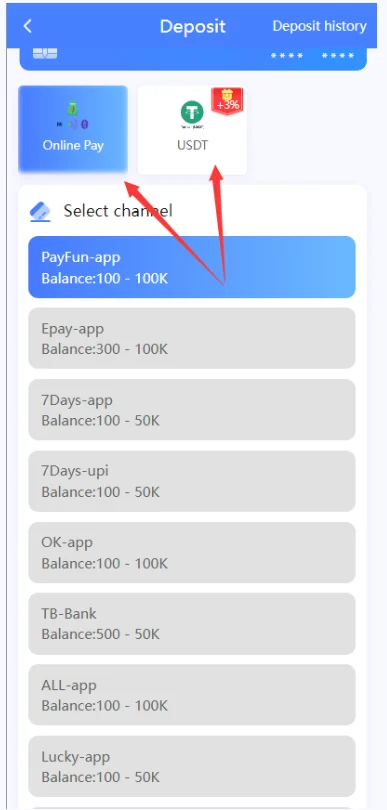
Choose a payment method
The next screen lists the methods the platform currently accepts. That list can include UPI, bank card, USDT, or other options. Pick one that you control, enter the amount the form allows, and finish only on that screen. Screenshot the confirmation the platform shows for your own records.
Safety checks
- Stay inside your own account until the wallet balance updates.
- Do not send money to an account number from SMS, Telegram, or WhatsApp.
- Do not share OTP or UPI PIN with anyone who offers to “complete recharge”.
- If the balance does not update, use the support path on the platform—not a stranger.
Withdraw steps are separate: see the withdraw guide. Gift codes are not the same as recharge; see the gift code guide. For limits and legality, read responsible gaming and the disclaimer.