
Guides
Goa Game Mobile Guide
How to use Goa Game on a phone browser, including menu, game cards, Add to Desktop, and why there is no APK on this site.

Goa Game guides are built for a phone browser first. You do not need an app install from this website. There is no official APK hosted on goa-gameofficial.com. If someone sends an APK file, treat it as untrusted.
Navigation on a small screen
Open the menu button in the header. Home, Games, Lottery, Colour Prediction, Aviator, Wingo, Blog, and Contact are listed there, with Login and Register. Login and Register open the platform; the rest stay on this guide site.
Reading games
Game cards stack in a single column on a narrow phone. The Popular Games row scrolls sideways—swipe that row only. Open one guide at a time so you are not mixing K3 rules with Wingo timers.
Add to Desktop vs APK
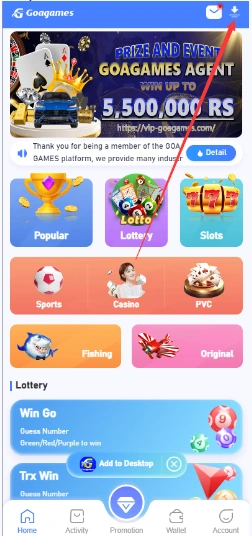
The platform home screen can include Add to Desktop, which adds a browser shortcut. That is not the same as installing an Android package. Details and a screenshot are in Open Goa Game from Your Phone. Also see app vs browser.
Android and iPhone
- Android: use Chrome or another current browser; skip unknown APK links.
- iPhone: use Safari or another current browser; do not install unknown configuration profiles.
- If the layout feels tight, rotate the phone or zoom once—avoid third-party “optimiser” apps.